> ## Documentation Index
> Fetch the complete documentation index at: https://help.rotapad.com/llms.txt
> Use this file to discover all available pages before exploring further.
# Use the dashboard
> See shift totals, progress and team stats, and export them as a PDF.
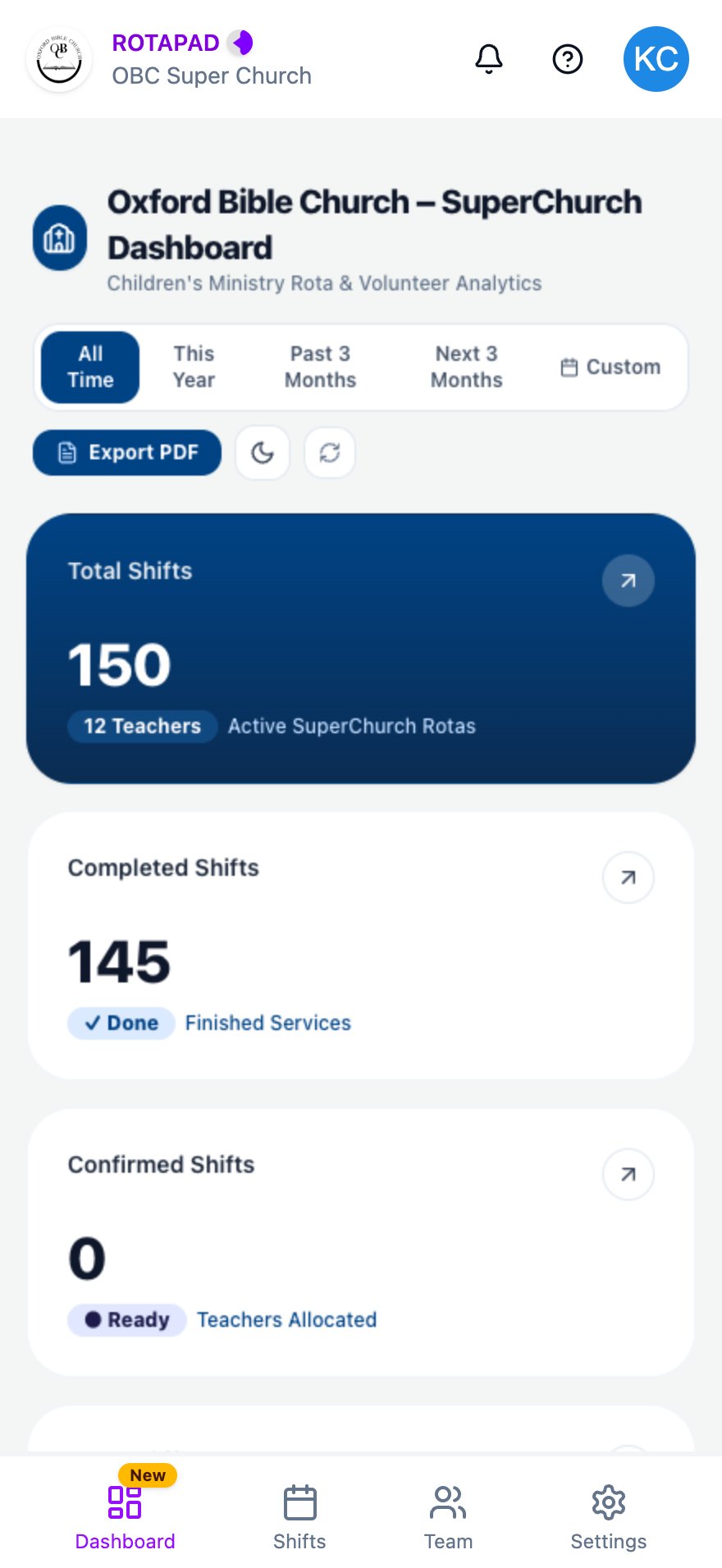
The **Dashboard** shows numbers and charts about the Children's Church rota: how many shifts there are, how many are done, and how the team is sharing them. Everyone on the team can see it.
Tap **Dashboard** in the bottom navigation bar to open it. Scroll down to see all of it.
 ## What it shows
The cards at the top give totals for the selected time range:
* **Total Shifts**
* **Completed Shifts**
* **Confirmed Shifts**
* **To Do Shifts**
Further down, the sections show shifts by month, overall progress, team statistics, Sunday availability and the service schedule.
## Change the time range
Tap a time range at the top to update the numbers: **All Time**, **This Year**, **Past 3 Months** or **Next 3 Months**.
## Other buttons
* **Export PDF:** downloads a two-page report for the selected time range: the totals and charts, then a list of past services and who was on them. The button shows **Generating PDF...** while the report is made. On a phone, the file goes wherever your browser saves downloads.
* **Moon or sun icon:** switches the dashboard between light and dark colours.
* **Circular arrows:** reloads the latest numbers.
## Common problems
### The dashboard doesn't load
If you see "Couldn't load the analytics dashboard", tap **Open it in a new tab instead** to open the dashboard on its own.
### The numbers look out of date
Tap the circular arrows to reload the latest numbers.
This documentation is built and hosted on [Mintlify](https://mintlify.com), a developer documentation platform.
## What it shows
The cards at the top give totals for the selected time range:
* **Total Shifts**
* **Completed Shifts**
* **Confirmed Shifts**
* **To Do Shifts**
Further down, the sections show shifts by month, overall progress, team statistics, Sunday availability and the service schedule.
## Change the time range
Tap a time range at the top to update the numbers: **All Time**, **This Year**, **Past 3 Months** or **Next 3 Months**.
## Other buttons
* **Export PDF:** downloads a two-page report for the selected time range: the totals and charts, then a list of past services and who was on them. The button shows **Generating PDF...** while the report is made. On a phone, the file goes wherever your browser saves downloads.
* **Moon or sun icon:** switches the dashboard between light and dark colours.
* **Circular arrows:** reloads the latest numbers.
## Common problems
### The dashboard doesn't load
If you see "Couldn't load the analytics dashboard", tap **Open it in a new tab instead** to open the dashboard on its own.
### The numbers look out of date
Tap the circular arrows to reload the latest numbers.
This documentation is built and hosted on [Mintlify](https://mintlify.com), a developer documentation platform.